Our Short List of 3

All 4 Picks at a Glance
| Product | Specs | Action |
|---|---|---|
 Samsung T9 2TB — the working drive for editing and ingest | Check price on Amazon | |
| SanDisk Extreme Pro Portable SSD USB4 2TB — the fastest ingest drive | Check price on Amazon | |
 LaCie Rugged USB-C 5TB — the field backup drive | Check price on Amazon | |
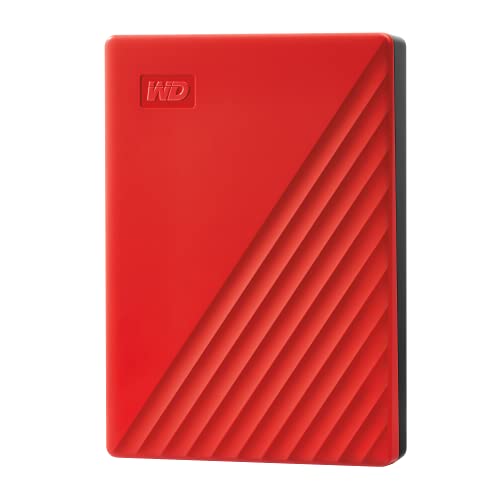 WD My Passport 5TB — the archive drive | Check price on Amazon |
Key takeaways
- Drives that handle 4K video files properly: two fast portable SSDs for editing and ingest, a rugged field drive and a 5TB archive disk, with workflow advice.
4K video is where ordinary storage stops being good enough. A single hour of 4K footage can run from roughly 25 gigabytes at modest bit rates to well past 100 gigabytes in the high-quality modes of modern cameras, and a single project — originals, proxies, exports — multiplies that several times over. Worse, video work is not just about capacity. Editing needs a drive that can stream several hundred megabytes per second without stuttering; ingesting a shoot needs a drive that can absorb a full card at full speed without slowing down halfway; archiving needs cheap terabytes that can sit safely for years. No single drive is best at all three jobs, so this guide is organised by job: two fast portable SSDs for the working and ingest roles, a rugged spinning drive for field backup, and a large portable hard drive for archive duty. All four verifiably sell on Amazon US.
One naming note before the picks: buyers search “hard drive” for all of these, but the fast drives below are solid-state, with no spinning parts, and the distinction matters for video. A portable spinning drive tops out around 120 to 140 megabytes per second in real transfers; a good portable SSD is ten times faster, and the newest ones are faster still. For anything the editing software touches directly, solid-state is the answer. For bulk storage that is written once and read rarely, spinning disks remain the sensible way to buy terabytes.
The four drives compared
Samsung T9 2TB — the working drive for editing and ingest
The Samsung T9 (ASIN B0CHFS9K14) is a portable SSD rated at up to 2,000 megabytes per second over USB 3.2 Gen 2×2, and it sustains its speed through long transfers better than most rivals, which is exactly the trait 4K work rewards: copying 200 gigabytes of footage is a sustained-write test, not a sprint. Its metal body sheds heat, it survives drops of up to three metres, and at 2TB it holds a typical project’s active footage with room for proxies and exports alongside.
One compatibility check matters. The T9’s full speed needs a USB 3.2 Gen 2×2 port, found on many Windows desktops and some laptops; Macs do not provide that mode and will run the drive at roughly half its rated speed, which is still several times faster than any spinning portable. Camera-direct recording is the other check: some cameras that record to USB drives certify specific models, so confirm the T9 against your camera maker’s list if you plan to record to it rather than copy to it.
SanDisk Extreme Pro Portable SSD USB4 2TB — the fastest ingest drive
SanDisk’s Extreme Pro in its USB4 version (ASIN B0DN688B7V) is the speed pick: rated at up to 3,800 megabytes per second read and 3,700 write over USB4, it empties large cards and moves project folders at a pace that changes how a shoot day feels — the copy finishes while you are still packing the camera away. It is forged-aluminium bodied, drop resistant to three metres and rated IP65 against dust and water jets, so it can live in a camera bag without ceremony.
The same port logic applies, sharpened: USB4 and Thunderbolt ports unlock its speed, and older USB ports run it at their own ceilings. On a current workstation or laptop with USB4, this is the drive that makes external storage feel internal. For creators who shoot high-bit-rate 4K daily and bill by the project, the time it returns on every single ingest is the argument.
LaCie Rugged USB-C 5TB — the field backup drive
The LaCie Rugged (ASIN B079HGSFY5) is the orange drive found in camera bags everywhere, and its job in a 4K workflow is different from the SSDs’: it is the second copy. Its 5TB of spinning storage costs a fraction per terabyte of any SSD, its rubber armour shrugs off drops, dust and being rained on briefly, and it connects over USB-C to anything. On location, the discipline that saves projects is copying cards to a fast SSD for editing and to a capacious drive like this for safekeeping, then formatting the card only when both copies exist.
Its speed ceiling — around 130 megabytes per second — rules it out as an editing drive for multicam or high-bit-rate work, though it will play back single-stream 4K for playback checks and delivery without complaint. Treat it as the vault, not the workbench, and its value is obvious: 5TB of protected storage that can absorb a whole trip’s footage.
WD My Passport 5TB — the archive drive
The My Passport 5TB (ASIN B085P17XND) is the quiet end of the workflow: the drive finished projects migrate to. It is a slim portable spinning drive with hardware encryption and password protection available through WD’s software, bus-powered over USB, and cheap per terabyte in a way no SSD approaches. A 4K library grows relentlessly, and the economics of keeping every finished project on SSDs collapse quickly; archiving to drives like this, labelled by year or client, is how working videographers actually do it.
Archive discipline matters more than archive hardware. Keep two copies of anything you cannot reshoot, on separate drives, ideally in separate places; check archive drives yearly by plugging them in and letting them spin; and retire a drive at the first sign of clicking, slow mounting or file errors rather than after a failure. The My Passport’s job is to be the inexpensive, replaceable half of that system.
How much 4K footage actually weighs
Capacity planning starts with your camera’s bit rate, because “4K” alone says almost nothing about file size. Consumer cameras recording efficient compressed 4K at around 100 megabits per second produce roughly 45 gigabytes per hour. Cameras with 400-megabit modes — common on enthusiast mirrorless bodies — produce about 180 gigabytes per hour. Cinema cameras and high-frame-rate modes go far beyond that: 4K slow motion at high bit rates can pass 500 gigabytes per hour of recorded material. A wedding shooter, a documentary day and a product-video session therefore have almost nothing in common storage-wise, and the first step in choosing drives is an honest hour count from your own cards.
From that figure, the working drive’s size follows: it should hold the project’s originals, its proxy files if you edit with them, and the exported masters, with a fifth of the drive left empty because SSDs slow down as they approach completely full. For most single-operator projects that arithmetic lands on 2TB, which is why both SSD picks in this guide are that size. The archive drive’s size follows a different rule — it should swallow a season of finished projects at once, which is why 5TB is the sensible floor for the role and why archive drives multiply over a career while working drives are replaced.
Ports, cables and the speeds you will actually see
Drive speeds printed on boxes assume the fastest port the drive supports, and the chain between drive and computer is only as fast as its slowest link. A USB4 drive in a USB 3 port runs at USB 3 speed. A fast drive on a slow hub shares the hub’s bandwidth with everything else on it. Even the cable matters: the short cables supplied with portable SSDs are chosen for the drive’s full speed, while a random long cable from a drawer may quietly cap the connection at the slowest USB rate. When a new drive benchmarks far below its specification, the cable and the port are the first suspects, in that order.
For spinning drives the port barely matters — no USB generation makes a portable hard disk faster than its platters — but for the SSDs in this guide it decides whether you bought 1,000 or 3,800 megabytes per second. Check your computer’s port specification before choosing between the two SSD picks: owners of USB4 or Thunderbolt machines get the SanDisk’s full value, owners of older USB 3 machines lose nothing by choosing the Samsung, whose speed their ports can nearly reach. Either way, both SSDs are so much faster than any spinning portable that the editing experience transforms; the port check simply decides which ceiling you are buying.
Setting up a 4K storage workflow that holds together
The four drives above suggest the workflow itself. Cards come off the camera onto the fastest drive you own — the SanDisk for ingest speed, the Samsung as the working drive the editor reads. A second copy lands on the Rugged before any card is formatted. Finished projects migrate to the archive drive, and the working SSD is cleared for the next job only after the archive copy is verified. Naming finishes the system: project folders dated and titled identically on every drive, so any file can be found on any copy without detective work.
Two technical habits protect the footage itself. Eject drives properly rather than unplugging them, because a write interrupted mid-file can corrupt the clip being written and occasionally the file system around it. And format cards in the camera, not the computer, after the copies are verified — in-camera formatting keeps the card’s file system exactly as the camera expects it.
Which drive should you buy first?
If you edit 4K and own no fast drive, buy the Samsung T9 first; it is the balanced working drive for the widest range of computers. If your machine has USB4 and your bottleneck is ingest time, buy the SanDisk Extreme Pro. If you shoot away from home and your current backup plan is optimism, buy the LaCie Rugged. And if your finished projects are scattered across full drives and loose folders, buy the My Passport and impose the archive system. Most serious 4K shooters end up owning one drive in each role — the order above is simply the order in which each one starts paying for itself. What all four picks share matters as much as what divides them: each is a current model from a maker that specialises in storage, each sells through a verified Amazon US listing, and each is sized for the job it is recommended for rather than stretched into a role its speed or capacity cannot support. That matching of drive to job, more than any single specification, is what makes a 4K storage setup feel effortless instead of fragile.
Disclosure: As an Amazon Associate, this site may earn from qualifying purchases made through links in this article, at no additional cost to you.