Key takeaways
- Find the best Kindle Fire tablet for reading, streaming, and family time. Compare screen size, storage, battery life, and everyday use across four models.
A Kindle Fire tablet is rarely bought for one job alone. The same device usually carries morning reading, an evening episode, a video call with family, and a child borrowing it for games, so the choice comes down to how much screen you want to hold, how much you want to store, and how long the battery lasts between charges. A screen that is too small makes long books feel cramped, while one that is too large stops being something you carry everywhere.

This guide is for readers who want one device for books and video, for parents choosing a first tablet for a child, and for anyone who wants a simple screen for the kitchen or the sofa. Every tablet below was chosen from the name and the specifications shown on its Amazon product page, so you can match each model to the way you actually plan to use it.
Quick Picks
As an Amazon Associate we earn from qualifying purchases
| Product | Best for | Key spec from title |
|---|---|---|
| Amazon Fire 7 (2022) | Reading on the move in a jacket pocket | 7-inch 1024 x 600 display, 16 GB |
| Amazon Fire HD 8 (2022) | A first tablet for a child or a parent | 8-inch HD display, 32 GB |
| Amazon Fire HD 10 (2023) | Evening video and reading at home | 10.1-inch Full HD display, 32 GB |
| Amazon Fire Max 11 | Light work, notes, and video calls | 11-inch 2000 x 1200 display, 64 GB |
How to Choose
Screen Size and Reading Comfort
Screen size decides how a Fire tablet feels in daily use more than any other single feature. A 7-inch screen slips into a small bag and rests easily in one hand on a crowded train, which suits readers who carry their tablet everywhere. An 8-inch screen gives text and comic panels a little more room without adding much weight, so it works well as a shared household tablet. A 10.1-inch or 11-inch screen makes video, magazines, and split-screen reading far more comfortable, yet the tablet becomes something you use on a sofa or at a table rather than on the move.
Storage and the microSD Slot
Every Fire tablet in this guide accepts a microSD card, and that changes how much the built-in storage matters. If you mainly stream video and read books downloaded one at a time, 16 GB or 32 GB is enough, because books take very little room and streamed shows leave nothing behind. If you download whole seasons before a trip, keep a large music library offline, or load the tablet with games for a child, the internal storage fills quickly and a card becomes essential. The practical move is to buy the storage size that covers your everyday apps and books, then add a microSD card for films and music.
Processor and Memory for Everyday Apps
Fire tablets are built for reading, streaming, and browsing, and the processor and memory decide how smoothly those jobs run. A quad-core chip with 2 GB of memory handles one app at a time comfortably, which is all most readers and casual viewers need. An octa-core chip with 3 GB or 4 GB of memory keeps more apps ready in the background, so switching from a book to a browser to a video call feels quicker. Heavy games and demanding creative apps are not the strength of this range, so match the chip to your real habits: light use stays happy on the smaller models, while anyone who juggles apps all day should step up.
Battery Life, Charging, and Lock-Screen Ads
Battery life on a Fire tablet depends on what you do with it, so treat the headline figure as a guide rather than a promise. Reading with the screen dimmed sips power, while bright video streaming and video calls drain the battery far faster, and leaving Alexa listening changes the result too. All of the models here charge over USB-C, and the larger tablets take longer to refill from empty, so an overnight charge suits them best. Also check whether the version you pick shows lock-screen ads, because the ad-supported version displays sponsored screensavers when the tablet wakes. Knowing both details before you buy prevents the most common surprises after delivery.
The 4 Best Options
Amazon Fire 7 (2022) — 16 GB, Black
The Fire 7 is the smallest and lightest tablet in this guide, and that is its whole appeal. Its 7-inch screen is big enough for comfortable reading yet small enough to carry in a coat pocket, a handbag, or a child’s backpack, and the quad-core processor keeps books, audiobooks, and standard video moving without fuss. With up to 10 hours of battery life it covers a full day of reading and listening, and the microSD slot means the modest built-in storage is easy to expand when downloads pile up. It is the natural pick when portability matters more than screen size or multitasking power.
Specs
- 7-inch touchscreen, 1024 x 600 resolution at 171 ppi, IPS technology
- Quad-core 2.0 GHz processor with 2 GB of RAM
- 16 GB of internal storage, microSD card slot for up to 1 TB of additional storage
- Up to 10 hours of battery life
- 2 MP front-facing camera
- USB-C charging with 5W power adapter included
- Alexa built in, Fire OS
Best for: Readers who want the lightest tablet to carry everywhere.
Watch out for: The small screen and 2 GB of memory make split-screen work and demanding games a poor fit.
ASIN: B099HL86MQ
Amazon Fire HD 8 (2022) — 32 GB, Black
The Fire HD 8 sits in the middle of the range, and that balance suits many households. Its 8-inch HD display shows books, comics, and video with more breathing room than the Fire 7, while the tablet stays light enough for a child to hold. The updated hexa-core processor keeps everyday apps responsive, and up to 13 hours of battery life covers reading, browsing, and video across a long day. Amazon Kids controls are built in, so a parent can shape what a child sees with no extra software to buy. It is the safe middle choice when one tablet has to serve several people.
Specs
- 8-inch HD display, 1280 x 800 resolution
- Updated hexa-core processor with 2 GB of RAM
- 32 GB of internal storage, microSD card slot for up to 1 TB of additional storage
- Up to 13 hours of battery life
- 2 MP front-facing camera
- USB-C charging with 5W power adapter included
- Alexa built in, Amazon Kids parental controls
Best for: A first tablet for a child or a parent, and shared family use.
Watch out for: The HD display is not Full HD, so fine text and detailed images look softer than on the larger models.
ASIN: B099Z8HLHT
Amazon Fire HD 10 (2023) — 32 GB, Black
The Fire HD 10 is the model to choose when the tablet will live mostly at home. Its 10.1-inch Full HD display shows films, magazines, and picture books in crisp detail, and the octa-core processor with 3 GB of memory moves between streaming apps, the browser, and the Kindle app without hesitation. Battery life stretches up to 13 hours, which covers an evening of video and a morning of reading, and the strengthened glass and durable build survive everyday knocks around the house. Stylus support adds a note-taking option for anyone who likes to write by hand.
Specs
- 10.1-inch Full HD display, 1920 x 1200 resolution, 224 ppi
- Octa-core processor with 3 GB of RAM
- 32 GB of internal storage, microSD card slot for up to 1 TB of additional storage
- Up to 13 hours of battery life
- 5 MP front-facing camera
- USB-C (2.0) cable and 9W power adapter included
- Made for Amazon Stylus Pen supported, sold separately
- Fire OS 8, Alexa built in
Best for: Evening video, magazines, and reading at home on a larger screen.
Watch out for: It is heavier and wider than the smaller Fire tablets, so one-handed reading on a commute gets tiring.
ASIN: B0BHZT5S12
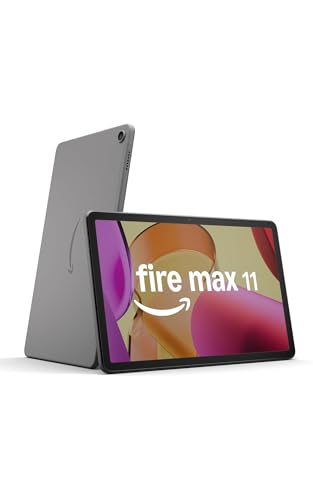
Amazon Fire Max 11 — 64 GB, Gray
The Fire Max 11 is the most capable Fire tablet, and it is the one to pick when the tablet has to do more than entertain. Its vivid 11-inch display with 2000 x 1200 resolution gives documents, web pages, and video room to breathe, while the octa-core processor, 4 GB of memory, and Wi-Fi 6 keep multitasking and streaming responsive. The 14-hour battery life carries it through a working day, and the 8 MP camera makes video calls noticeably clearer than the cameras on the smaller models. An optional keyboard case and stylus turn it into a light work machine.
Specs
- 11-inch display, 2000 x 1200 resolution, certified for low blue light
- Octa-core processor with 4 GB of RAM
- 64 GB of internal storage, microSD card slot for up to 1 TB of additional storage
- Up to 14 hours of battery life
- 8 MP camera for video calls
- Wi-Fi 6 connectivity
- Optional Fire Max 11 Keyboard Case and Made for Amazon Stylus Pen, sold separately
- Slim aluminum design with strengthened glass, Alexa built in
Best for: Light work, note-taking, and video calls on the largest Fire screen.
Watch out for: The keyboard case and stylus are sold separately, so the full work setup needs extra accessories.
ASIN: B0B1VQ1ZQY
Which One Fits Your Situation
Reading on the Move and in Bed
Pick the Fire 7 when the tablet travels with you everywhere. Its 7-inch screen and light body make one-handed reading easy on a train or in bed, and the 10-hour battery covers a day of books and audiobooks. The Fire HD 8 is the better call if you read comics or magazines, because the larger screen gives panels more room. Load your books before you leave and keep a microSD card handy for audiobooks.
A First Tablet for a Child or a Parent
Pick the Fire HD 8 for a first tablet. Its 8-inch screen is easy for small hands to hold, the battery lasts through a day of games and stories, and Amazon Kids controls let a parent set limits and choose content. The Fire 7 also works for younger children because it is lighter, while the Fire HD 10 suits an older child who watches a lot of video. Add a sturdy case first.
Video Nights and Shared Family Viewing
Pick the Fire HD 10 for video nights at home. Its 10.1-inch Full HD display makes films look their best, and the larger screen suits two people watching together. The Fire Max 11 goes further with the sharpest picture and the clearest video calls, thanks to its bigger display and 8 MP camera. The smaller models still play video well, but they suit one viewer at a time.
Light Work, Notes, and Video Calls
Pick the Fire Max 11 when the tablet doubles as a work device. Its 11-inch screen fits documents and web pages, the 4 GB of memory keeps several apps open, and the optional keyboard case and stylus make typing and handwriting practical. The Fire HD 10 is a fair fallback for occasional email and browsing. Fire tablets run the Amazon Appstore, so check that the apps you need for work are available there first.
Common Mistakes
- Buying the smallest screen to save space, then finding long reading sessions and video feel cramped on a 7-inch display.
- Choosing 16 GB of storage and filling it with downloaded films and games before adding a microSD card.
- Expecting a Fire tablet to run every app from another app store, when it uses the Amazon Appstore.
- Picking the ad-supported version without noticing, then being surprised by sponsored screensavers on the lock screen.
- Judging battery life by the headline figure alone, when bright video streaming drains the battery much faster than reading.
Frequently Asked Questions
Can I read Kindle books on a Fire tablet?
Yes. Every Fire tablet runs the Kindle app, so books bought from the Kindle store sync to the tablet along with bookmarks, notes, and reading progress. The app also adjusts font size, line spacing, and screen brightness, which makes long reading sessions comfortable. Downloaded books stay available offline, so you can keep reading on a plane or anywhere without a connection.
Do Fire tablets run the apps I already use?
Fire tablets run apps from the Amazon Appstore, which covers the major streaming services, social apps, video calling, and many popular games. Some apps that live only on other app stores are missing, so check the Appstore listing for each app you rely on before buying. The Silk browser also covers web versions of services that have no Fire app.
How much storage do I actually need?
For reading and streaming, 16 GB or 32 GB is enough, because books take little room and streamed video leaves nothing stored. If you download films for travel, keep music offline, or load games for a child, choose 32 GB or 64 GB and add a microSD card. All four tablets here accept cards up to 1 TB, so storage is easy to expand later.
Can I add a keyboard or a stylus to a Fire tablet?
Yes, on the larger models. The Fire Max 11 has an optional keyboard case and a Made for Amazon Stylus Pen, both sold separately, which suit typing and handwritten notes. The Fire HD 10 supports a stylus, also sold separately. The smaller Fire 7 and Fire HD 8 work with Bluetooth keyboards, but their screens are small for long typing sessions.