Our Short List of 3
All 3 Picks at a Glance
| Product | Specs | Action |
|---|---|---|
 Sonos Beam (Gen 2) | Check price on Amazon | |
 Bose Smart Soundbar 600 | Check price on Amazon | |
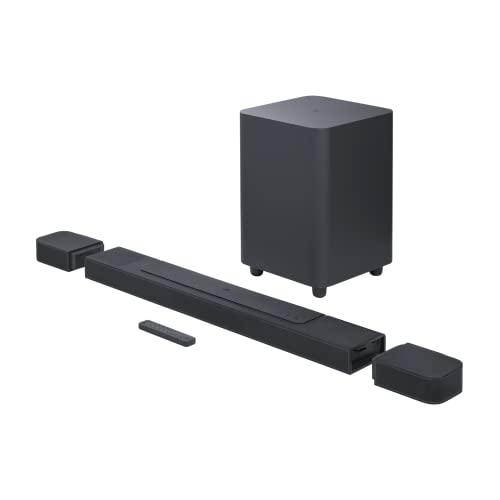 JBL Bar 1000 | Check price on Amazon |
Key takeaways
- Find the best soundbars compatible with Google Home, from compact Dolby Atmos bars with built-in voice control to full surround systems with Chromecast built in.
The best soundbars compatible with Google Home are the Sonos Beam (Gen 2), the Bose Smart Soundbar 600, and the JBL Bar 1000. Each one connects to the Google Home ecosystem in a slightly different way, through built-in voice control, Chromecast built in, or Works with Google Assistant support through a linked Google device. The right pick depends on your room size, whether you want a single compact bar or a full surround system with a subwoofer and rear speakers, and how you plan to control it.
What “Compatible With Google Home” Actually Means
The phrase covers three different kinds of compatibility, and knowing which one a soundbar provides matters more than the label on the box.
First, some soundbars have Google Assistant built in. You can talk to the bar itself, ask it to play music, and control smart home devices without reaching for another speaker. The Sonos Beam (Gen 2) works this way.
Second, some soundbars have Chromecast built in. That means you can cast audio to them from apps on your phone, add them to speaker groups in the Google Home app, and play the same music across several rooms at once. The JBL Bar 1000 falls into this group, and it also appears in the Google Home app as a cast target you can group with Nest speakers.
Third, some soundbars carry Works with Google Assistant support, which means a Google device you already own, such as a Nest speaker or a phone with Google Assistant, can control the soundbar. The Bose Smart Soundbar 600 works this way: Alexa is built into the bar itself, while Google Assistant control comes through a compatible Google device on the same network.
Before buying, decide which of these three you actually want. If you want to walk into the room and say “Hey Google, play my evening playlist on the soundbar,” you need either a bar with Google Assistant built in or a Chromecast built-in bar linked to a Google Home speaker. If you mostly want to cast music from your phone and group the soundbar with other speakers, Chromecast built in is the feature to look for. If you already have a Nest speaker in the room and just want it to turn the volume up and down, Works with Google Assistant support is enough.
How to Choose a Google Home Compatible Soundbar
Room size comes first. A compact bar suits a bedroom or a small living room, where a long bar or a separate subwoofer would dominate the space. A larger room, or a room with high ceilings, benefits from up-firing drivers and a separate subwoofer that fill the space with sound.
Channels tell you how the bar builds its soundstage. A 7.1.4 system, like the JBL Bar 1000, uses seven surround channels, one subwoofer channel, and four height channels for overhead effects. A compact bar builds a smaller soundstage, and relies on processing to create a sense of width and height. Neither approach is automatically better; the question is how much hardware you want in the room.
Connectivity matters as much as sound. Look for HDMI eARC if your television supports it, because it carries high-quality audio from the television to the bar over a single cable and lets the television remote control the volume. Wi-Fi matters for casting and multi-room audio, while Bluetooth is useful for quick connections from a phone or laptop. An optical input is a handy fallback for older televisions.
Voice control is the feature that ties the bar into Google Home. Check whether the assistant is built into the bar, available through Chromecast, or available through a separate Google device. Also check whether the bar has a microphone mute control, so you can switch off listening when you want privacy.
Finally, think about expansion. Some bars work as part of a wider system, letting you add a subwoofer or rear speakers later, or pair with other speakers from the same brand for multi-room sound. Others are complete as they stand. If you expect your setup to grow, a bar with an expansion path is worth more than one that is sealed.
Comparison Table
| Soundbar | Google Home compatibility | Channels | Key features |
|---|---|---|---|
| Sonos Beam (Gen 2) | Google Assistant built in | Dolby Atmos compact bar | HDMI eARC, AirPlay 2, Wi-Fi, speech enhancement, night sound |
| Bose Smart Soundbar 600 | Works with Google Assistant via a compatible Google device; Alexa built in | Dolby Atmos with two up-firing drivers | TrueSpace processing, Voice4Video, SimpleSync, Bose Music app |
| JBL Bar 1000 | Chromecast built in; works with Google Home; voice control via a linked Google device | 7.1.4 with detachable surround speakers | 10-inch wireless subwoofer, MultiBeam, PureVoice dialogue, JBL One app |
Sonos Beam (Gen 2)
The Sonos Beam (Gen 2) is the compact pick in this guide, and it is the most direct fit for a Google Home household because Google Assistant is built into the bar itself. You can ask it to play music, check the weather, or control smart home devices, and you can also use Alexa if your household leans that way. The bar connects over Wi-Fi, supports Apple AirPlay 2, and links to a television through HDMI eARC, with an HDMI ARC port and an Ethernet port on the back.
Sound comes from a compact bar with a perforated grille and touch controls on top. It supports Dolby Atmos, and Sonos built it to make dialogue clear: speech enhancement lifts voices out of the mix, and night sound softens sudden loud effects so late viewing stays comfortable. The bar is small enough to sit under most televisions or on a narrow shelf, which makes it a strong choice for bedrooms and smaller living rooms.
Setup runs through the Sonos app, and once the bar is on your network you can link it to the Google Home app as well. That link is what lets a Google Home speaker, or the bar itself, handle voice commands for music and playback. If you already own other Sonos speakers, the Beam joins them for multi-room audio, so music can follow you from the living room to the kitchen.
The Beam (Gen 2) suits someone who wants a single, tidy bar that handles both television sound and music, and who wants Google Assistant without adding another speaker to the room. It is the simplest setup in this guide: one bar, one cable to the television, and voice control ready from the start.
The black model covered here is ASIN B09GPYL7BJ, model BEAM2US1BLK.
Bose Smart Soundbar 600
The Bose Smart Soundbar 600 is a compact Dolby Atmos bar built around two upward-firing transducers and Bose TrueSpace processing, which is designed to create a sense of height and width from a single bar. It is compact for its class, and Bose positions it as a bar that delivers immersive sound without taking over the room.
Voice control on the 600 works in two ways. Amazon Alexa is built in, with noise-rejecting microphones that listen for commands. Google Assistant control comes through Works with Google Assistant support: link the bar with a compatible Google device on the same network, and that device can control playback and volume. This is the right arrangement if you already have a Nest speaker or a Google Assistant phone in the room and want it to run the soundbar.
The bar also includes Bose Voice4Video technology, which lets you control the soundbar, the television, and a cable or satellite box with your voice. SimpleSync pairs the bar with compatible Bose products so sound can follow you between rooms. Streaming runs over Wi-Fi and Bluetooth, with Apple AirPlay 2 and Spotify Connect supported, and the included remote and the Bose Music app give you control when you do not want to use voice at all.
Setup is straightforward: connect the bar to the television, connect it to Wi-Fi through the Bose Music app, and link your Google device for Assistant control. The bar suits someone who wants a compact Dolby Atmos bar with strong dialogue clarity and flexible control, and who already has a Google device in the room to handle Assistant commands.
The black model covered here is ASIN B0BB4N2CTW, model number 873973-1100.
JBL Bar 1000
The JBL Bar 1000 is the full home theater system in this guide. It is a 7.1.4-channel soundbar with detachable wireless surround speakers, a 10-inch wireless subwoofer, and a total system output of 880 watts. Two up-firing drivers sit in the main bar and two more sit in the detachable speakers, so Dolby Atmos and DTS:X effects come from above as well as around you.
The detachable speakers are the feature that sets this system apart. Docked on the ends of the bar, they charge and act as part of the front soundstage. Lift them off and place them behind the sofa, and they become true wireless rear surround speakers. When the film ends, dock them again and the system returns to a single bar. That flexibility makes the Bar 1000 work in rooms where permanent rear speakers are not practical.
Google Home compatibility comes through Chromecast built in. You can cast music from apps on your phone, add the bar to speaker groups in the Google Home app, and control playback with a Google Home voice-activated speaker on the same network. Link the bar with a voice assistant device and you can ask Google Assistant to stream music to it, change the volume, or skip tracks. The bar also supports Alexa Multi-Room Music and Apple AirPlay 2 over its built-in Wi-Fi, and Bluetooth is available for direct connections.
Dialogue clarity comes from PureVoice technology, which is designed to keep speech clear even when the action gets loud. The JBL One app handles setup, equalizer settings, and browsing of integrated music services. The bar has three HDMI inputs and one HDMI ARC output, so a console, a streaming box, and a player can all stay connected.
The Bar 1000 suits someone who wants a complete surround system for films and music, with real rear speakers and a dedicated subwoofer, and who wants it tied into Google Home through Chromecast and voice control. It is the largest system in this guide, and it needs the room to match.
The black model covered here is ASIN B0BQPPMBJG, model JBLBAR1000PROBLKAM.
Setting Up a Soundbar With Google Home
Start by connecting the soundbar to your television, usually with the HDMI cable in the box, and connect the bar to Wi-Fi through its own app. Once the bar is on the network, open the Google Home app and check whether it appears as a cast target or a linked device. Chromecast built-in bars appear automatically once they share the network, while bars with Works with Google Assistant support need to be linked through the app.
Next, build a speaker group if you want music in more than one room. Add the soundbar and your Nest speakers to the same group in the Google Home app, give the group a name, and cast to the group instead of a single speaker. Keep the bar and the Google device on the same Wi-Fi network, because grouping and voice control both depend on that shared connection.
Test voice control with a simple command, such as asking Google Assistant to play music on the soundbar or to turn the volume up. If the command does not reach the bar, check that the bar is linked in the Google Home app and that the Google device and the bar are on the same network. If the bar has a microphone, check that it is switched on.
Finally, set the television to send audio to the soundbar through HDMI eARC or ARC, and turn off the television’s own speakers so sound comes from one place only. That single step avoids the echo that comes from a television and a soundbar playing at once.
Frequently Asked Questions
Do all soundbars work with Google Home?
No. A soundbar works with Google Home when it has Google Assistant built in, has Chromecast built in, or carries Works with Google Assistant support through a linked Google device. A bar with only Bluetooth and no Wi-Fi or casting support cannot join the Google Home ecosystem, so check the connectivity list before buying.
Can I control a soundbar with my voice if Google Assistant is not built in?
Yes, in many cases. A soundbar with Chromecast built in can be controlled by a Google Home speaker on the same network, and a bar with Works with Google Assistant support can be controlled by a compatible Google device. The bar itself does not need a microphone for this to work; the Google device listens, and the bar plays.
Can I add a soundbar to a speaker group with Nest speakers?
Yes, if the soundbar has Chromecast built in or appears in the Google Home app as a cast target. Add it to a group in the app alongside your Nest speakers, and music cast to the group plays everywhere at once. Keep every device on the same Wi-Fi network for grouping to work reliably.
Is a soundbar with a separate subwoofer better for Google Home use?
A separate subwoofer changes the sound, not the Google Home connection. It adds depth for films and music, and it suits larger rooms. For Google Home control, what matters is the bar’s casting and voice support, which works the same way whether the subwoofer is built in or separate.
What should I check before buying a Google Home compatible soundbar?
Check three things: the type of Google Home support, meaning built-in Assistant, Chromecast built in, or Works with Google Assistant; the connections your television supports, preferably HDMI eARC; and the size of the bar against your room and your television stand. Confirm the exact model and ASIN on the listing before ordering, so the bar you receive is the one with the features described here.
Final Thoughts
A soundbar earns its place in a Google Home household by fitting the way you already listen. The Sonos Beam (Gen 2) is the compact choice with Google Assistant built in, the Bose Smart Soundbar 600 is the compact Dolby Atmos bar that pairs with a Google device you already own, and the JBL Bar 1000 is the full surround system with Chromecast built in and detachable rear speakers. Pick the type of Google Home support you want first, match the size and channels to your room, and confirm the exact model on the listing before you buy.
Disclosure: As an Amazon Associate, we earn from qualifying purchases.