Our Short List of 3
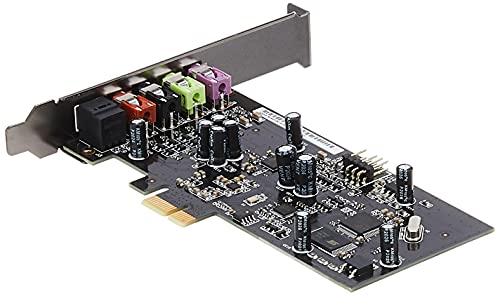
- Best for: a first upgrade from onboard audio in a standard or compact desktop.
- Interface: PCI Express x1, low-profile bracket included
- Audio output: 5.1 channel, up to 192kHz/24-bit
- Signal-to-noise ratio: 116 dB
- Headphone amplifier: 300 ohm

- Best for: PC gamers who want surround sound, a strong headphone amp and voice chat features in one card.
- Interface: PCI Express x1
- Audio output: 5.1 discrete and virtual surround, upgradable to 7.1 with DBPro
- Playback: 24-bit/192kHz, 120 dB DNR
- Headphone amplifier: 32 to 600 ohm

- Best for: gamers and music listeners who want a proven all-round card with a strong headphone amp.
- Interface: PCI Express x1
- Model number: SB1500
- Signal-to-noise ratio: 116 dB
- Headphone amplifier: 600 ohm
All 3 Picks at a Glance
| Product | Specs | Action |
|---|---|---|
| ASUS Xonar SE |
| Check price on Amazon |
| Creative Sound Blaster Audigy Fx V2 |
| Check price on Amazon |
| Creative Sound Blaster Z |
| Check price on Amazon |
Key takeaways
- Onboard audio hisses, clips and runs out of drive for good headphones. Compare three internal PCIe sound cards with real DAC specs and headphone amps.
A motherboard’s built-in audio is good enough until it is not. The hiss that appears when you turn the volume up, the flat sound from a pair of headphones that deserves better, the lack of a clean input for a microphone: these are the moments when a dedicated card starts making sense. What you are really choosing is a digital-to-analogue converter and a headphone amplifier that live inside your case, away from the electrical noise of the motherboard, and the right card depends on what you plug into it.
This article is for PC gamers who want cleaner positional audio, music listeners with headphones that onboard audio cannot drive properly, and home studio users who need a low-latency input for recording. Each card below was chosen from the names and specifications on its Amazon product page, with the converter resolution, signal-to-noise ratio and headphone amplifier ratings taken from the listing and the manufacturer’s specification sheets, so you can compare the hardware rather than the slogans.
Quick Picks
As an Amazon Associate we earn from qualifying purchases
| Product | Best for | Key spec from title |
|---|---|---|
| ASUS Xonar SE | A first upgrade from onboard audio | 5.1 channel, 192kHz/24-bit, 116dB SNR |
| Creative Sound Blaster Audigy Fx V2 | Gaming with voice chat and surround | 5.1 discrete surround, 120dB DNR, 600-ohm amp |
| Creative Sound Blaster Z | A classic all-round gaming card | 116dB SNR, 600-ohm headphone amp, beamforming mic |
How to Choose
Start with the headphones or speakers you already own
A sound card only earns its place if something downstream can reveal the difference. Efficient earbuds and basic desktop speakers will sound much the same through any decent output, while high-impedance headphones above 250 ohms will stay quiet and lifeless without a proper amplifier. Look at the headphone amplifier rating on the card: a 300-ohm amp covers most gaming headsets, while a 600-ohm amp opens the door to studio headphones. For a 5.1 speaker set, the card needs discrete surround outputs for front, rear and centre/subwoofer channels, not a virtual surround mode that folds everything into two channels. List your gear before you shop, then match the card to it.
Read the converter numbers as a floor, not a promise
Two figures dominate every sound card listing: the sample rate and bit depth, usually 192kHz at 24-bit, and the signal-to-noise ratio in decibels. Higher numbers mean the card can reproduce more detail with less background hiss, and a jump from the 90-decibel range of typical onboard audio to 116 or 120 decibels is audible on good headphones. But the converter is only part of the chain; the amplifier stage, the shielding and the analogue output design decide what actually reaches your ears. Treat 116dB SNR and 24-bit/192kHz as the sensible minimum for a worthwhile upgrade, and be sceptical of any card that hides these numbers entirely.
Check the slot, the bracket and the operating system
Every card here uses a PCIe x1 slot, which sounds universal until you open a small form factor case and find the slot blocked by a graphics card or the bracket is the wrong height. Low-profile brackets matter for slim cases, and some cards include both half-height and full-height brackets in the box, which removes the guesswork. Driver support is the other trap: a card built for Windows 10 may have no official driver for a newer system, and Linux support varies by chipset, with C-Media based cards generally faring better than proprietary ones. Confirm a free PCIe slot, measure the clearance, and check the driver page for your operating system before ordering.
Decide what the microphone input is actually for
If you only chat with friends in games, a basic mic input with noise reduction is plenty, and some cards add voice-detection features that unmute you automatically when you speak. Recording vocals or instruments is a different demand: you want a clean input path, ASIO support for low-latency monitoring, and ideally a dedicated line-in separate from the mic-in so you are not constantly swapping cables. A beamforming microphone built into the card itself is a bonus for voice calls, not a replacement for a real microphone. Be honest about whether you record or just talk, because the cards that do both well cost more than the ones that only do one.
The 3 Best Options
ASUS Xonar SE
- Best for: a first upgrade from onboard audio in a standard or compact desktop.
- Interface: PCI Express x1, low-profile bracket included
- Audio output: 5.1 channel, up to 192kHz/24-bit
- Signal-to-noise ratio: 116 dB
- Headphone amplifier: 300 ohm
a first upgrade from onboard audio in a standard or compact desktop.
the manufacturer’s own store listing has shown the card out of stock, so confirm a seller has new stock before ordering, and check Windows driver support for your exact system version.
The Xonar SE is the sensible entry point for anyone whose onboard audio is the weakest link in an otherwise good setup. Built around a C-Media CM6620A processor, it delivers 5.1-channel surround at 192kHz and 24-bit resolution with a 116dB signal-to-noise ratio, which is a clear step up from the audio chip on most motherboards. A built-in 300-ohm headphone amplifier drives demanding gaming headsets with proper bass, and the low-profile bracket means it fits small form factor cases that bigger cards cannot enter. It is a straightforward card with no lighting and no extra daughterboards, aimed at listeners who want better sound without a project.
Watch out for: the manufacturer’s own store listing has shown the card out of stock, so confirm a seller has new stock before ordering, and check Windows driver support for your exact system version.
Creative Sound Blaster Audigy Fx V2
- Best for: PC gamers who want surround sound, a strong headphone amp and voice chat features in one card.
- Interface: PCI Express x1
- Audio output: 5.1 discrete and virtual surround, upgradable to 7.1 with DBPro
- Playback: 24-bit/192kHz, 120 dB DNR
- Headphone amplifier: 32 to 600 ohm
PC gamers who want surround sound, a strong headphone amp and voice chat features in one card.
stock trackers showed this card as currently unavailable in late November 2026, so verify a seller has it in stock before ordering, and note the DBPro expansion is sold separately.
Creative’s Audigy Fx V2 is the gaming-focused card of the three, and its headline features are aimed at players who talk as much as they listen. Playback runs at 24-bit and 192kHz with a 120dB dynamic range, the headphone amplifier handles models from 32 to 600 ohms, and the surround options cover both discrete 5.1 and virtual 5.1 for headphones. The SmartComms Kit adds VoiceDetect, which unmutes your microphone when you speak, and NoiseClean, a two-way noise cancellation system for voice chat. A connector on the board accepts the optional DBPro daughterboard, which adds DSD256 playback, full 7.1 discrete surround and an optical output for later expansion.
Watch out for: stock trackers showed this card as currently unavailable in late November 2026, so verify a seller has it in stock before ordering, and note the DBPro expansion is sold separately.
Creative Sound Blaster Z
- Best for: gamers and music listeners who want a proven all-round card with a strong headphone amp.
- Interface: PCI Express x1
- Model number: SB1500
- Signal-to-noise ratio: 116 dB
- Headphone amplifier: 600 ohm
gamers and music listeners who want a proven all-round card with a strong headphone amp.
this is a long-running model, so check whether the seller is offering new stock or a used card, and confirm driver support for your operating system, since the card predates current Windows versions.
The Sound Blaster Z has been around since 2012, and it survives because the formula still works: a 116dB signal-to-noise ratio, a 600-ohm headphone amplifier, and a beamforming microphone built into the card for clear voice pickup without a headset mic. SBX Pro Studio processing handles surround virtualisation and bass enhancement, and the card supports ASIO for low-latency recording, which makes it usable for light home studio work as well as gaming. It is an older design, so it lacks the newer card’s voice-detection tricks and upgrade path, but for a desktop that needs one solid all-round card, the Z remains the benchmark other budget cards are measured against.
Watch out for: this is a long-running model, so check whether the seller is offering new stock or a used card, and confirm driver support for your operating system, since the card predates current Windows versions.
Which One Fits Your Situation
You want the cheapest real step up from onboard audio
Pick the ASUS Xonar SE. Its 116dB SNR and 300-ohm amplifier are enough to transform most gaming headsets and desktop speakers, the low-profile bracket fits compact cases, and there is nothing to configure beyond the driver. It is the card to buy when you want better sound, not a new hobby.
You game with friends and talk constantly
Pick the Creative Sound Blaster Audigy Fx V2. Scout Mode helps you hear footsteps, the SmartComms Kit keeps your voice clean without fiddling with push-to-talk, and the 600-ohm amplifier drives whatever headset you upgrade to next. The optional DBPro daughterboard also leaves room to grow later. Just confirm stock first, since availability has been patchy.
You listen to music on serious headphones and sometimes record
Pick the Creative Sound Blaster Z. The 600-ohm amplifier and ASIO support cover both the listening and the recording sides of a home setup, and the beamforming microphone is genuinely useful for calls. That built-in mic also saves you buying a separate one for calls. Buy new from a reputable seller, given the card’s long history on the market.
Common Mistakes
- Buying a sound card before checking for a free PCIe x1 slot, then finding the graphics card or a drive cage blocks it.
- Paying for a 600-ohm headphone amplifier while using efficient earbuds that would sound the same through onboard audio.
- Choosing a card for its surround claims without checking whether it offers discrete 5.1 outputs for a real speaker set or only virtual surround for headphones.
- Ignoring driver support and discovering after installation that the card has no official driver for the current version of Windows.
- Expecting a sound card to fix bad speakers or broken headphones, when the weakest link in the chain is usually the thing at the end of the cable.
Frequently Asked Questions
Do I still need a sound card in 2026?
For most people, no. Modern onboard audio is good enough for basic speakers and efficient headsets. A dedicated card earns its place when you own high-impedance headphones, a 5.1 speaker set, or you record audio and need a clean, low-latency input that onboard chips cannot provide.
Will an internal sound card work in a laptop?
No. Internal cards need a free PCIe slot inside a desktop case, so they are useless for laptops. Laptop owners who want better audio should look at external USB DACs and amplifiers instead, which deliver the same converter and amplifier upgrade without opening anything.
What is the difference between discrete and virtual surround?
Discrete surround sends separate audio channels to separate speakers, so a 5.1 set gets a real front, rear and centre signal. Virtual surround takes a surround signal and processes it for two headphone drivers, simulating direction. Both have their place, but only discrete surround drives a physical speaker set properly.
Can a sound card improve my microphone quality?
It can help, but only within limits. A clean input path with low noise and features like two-way noise cancellation will make your voice clearer in calls and streams. It will not turn a cheap headset microphone into a studio microphone; for recording vocals or instruments, a proper microphone and an audio interface matter more than the card.