Our Short List of 3
All 4 Picks at a Glance
| Product | Specs | Action |
|---|---|---|
 Microsoft Surface Pro 11 — the detachable that is a real tablet | Check price on Amazon | |
 Lenovo Yoga 7i 2-in-1 — the convertible all-rounder | Check price on Amazon | |
 HP Spectre x360 14 — the premium convertible | Check price on Amazon | |
 HP Envy x360 14 — the value convertible | Check price on Amazon |
Key takeaways
- The best touch screen laptops on sale today: a Surface Pro detachable, two premium convertibles and a value 2-in-1, compared on screens, pens and weight.
A touch screen on a laptop earns its place in specific moments: signing a document without printing it, marking up a PDF with a pen, flipping the screen around a hinge to show a client a drawing, tapping through a presentation in tent mode, or sketching a diagram in a meeting. Today’s touch laptops divide into two shapes. Convertibles fold their keyboard behind the screen on a 360-degree hinge. Detachables split in two, leaving a true tablet when the keyboard comes off. Both shapes now come with fast processors, sharp OLED or IPS panels and proper active-pen support, and the four machines below are the current models that verifiably sell on Amazon US, one detachable and three convertibles across the price ladder.
One expectation is worth setting first. A touch screen does not make a laptop a drawing tablet by itself: for pen work you want an active stylus with pressure levels, which all four of these support, and you want the screen to lie flat or fold back far enough to draw on. All four picks fold fully or detach, so all four can be drawn on like paper.
The four laptops compared
Microsoft Surface Pro 11 — the detachable that is a real tablet
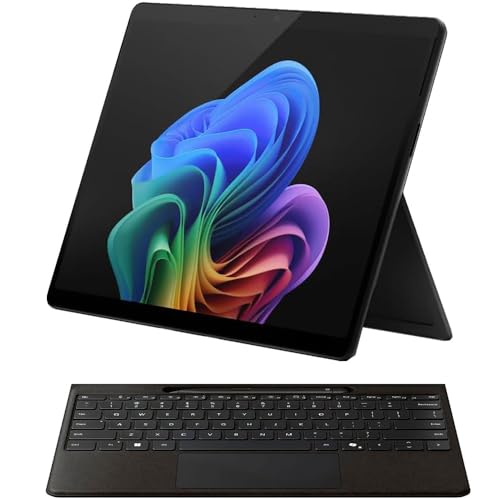
The Surface Pro 11 bundle (ASIN B0DN2YY381) pairs the 13-inch Surface Pro with the Surface Pro Keyboard, and it remains the reference design for this category. The screen is a 13-inch PixelSense Flow OLED at 2880 by 1920 with a refresh rate up to 120 Hz, which makes pen strokes and scrolling feel immediate in a way 60 Hz panels do not. This configuration runs a Snapdragon X Elite processor with 16GB of memory and a 1TB solid-state drive, so it is a full Windows 11 machine, not a companion device — with the standing caveat of the ARM platform: nearly all mainstream Windows software now runs on it, but a few specialist programs and older peripherals still assume an Intel or AMD chip, and that check belongs before purchase, not after.
Detached, it is a 13-inch tablet of under two pounds that takes the Slim Pen for notes and drawing. Attached, the keyboard and kickstand make a genuine laptop for typing, with the kickstand’s wide angle range solving the lap problem better than most detachable designs. For buyers whose work mixes desk typing with tablet reading and pen markup in roughly equal parts, this is the machine the rest of the category is measured against.
Lenovo Yoga 7i 2-in-1 — the convertible all-rounder
Lenovo’s Yoga line is the convertible in its classic form, and the Yoga 7i (ASIN B0FQ364776) is the balanced current model: a 14-inch-class touch display on a 360-degree hinge, an Intel Core processor, and a chassis that works as a laptop all week and folds into a presentation or media tablet when asked. The hinge is the detail to value here — Lenovo has been refining it for a decade, and it holds the screen steady in tent and stand modes without the wobble that makes touch input annoying on cheaper convertibles.
In tablet mode a folded convertible is thicker and heavier than a detachable, and the Yoga is no exception; what you get in exchange is a full-size keyboard and trackpad that never detach, ports that stay with the machine, and no separate keyboard accessory to buy or charge. For students and office workers who want one machine for notes, documents and media, with pen support for annotation, this is the straightforward recommendation.
HP Spectre x360 14 — the premium convertible
The Spectre x360 14 (ASIN B0DM576K21) is HP’s flagship convertible, built around a 14-inch OLED touch display with slim bezels, an aluminium body and the polished hinge and keyboard that define the Spectre line. It is the pick for buyers who will look at the screen all day: OLED contrast suits photo and design work, the panel’s colour coverage is aimed at creators, and the included pen support turns it into a capable sketching and markup surface when folded flat.
Convertibles at this level justify themselves in the accumulation of small things — a keyboard with proper key travel, speakers that face the listener in every mode, a webcam good enough for client calls, and a battery that survives a working day of mixed laptop and tablet use. The Spectre’s compromises are the usual flagship ones: it costs more than the Yoga class, and its thin body leaves fewer legacy ports, so a small USB-C hub may join it in the bag.
HP Envy x360 14 — the value convertible
The Envy x360 14 (ASIN B0CW1MRFV7) brings the same folding design a step down the range: a 14-inch Full HD IPS touch display at 250 nits, 16GB of memory, a 1TB solid-state drive, a backlit keyboard and a fingerprint reader, in a body of about 3.35 pounds. The listing records for this model disagree on the exact Core i7 variant inside, so the honest description is a 13th-generation Intel Core i7 — confirm the precise chip on the product page before ordering, since both variants perform closely but they are not the same part.
What you give up against the Spectre is the OLED panel and some brightness; what you keep is the part that matters most for this category — a proper 360-degree hinge, pen-capable touch, and enough memory and storage that the machine will not feel cramped in three years. As a family or student laptop that doubles as a big tablet for reading, recipes, sheet music and video, it is the sensible end of the range.
What touch adds, and what it costs
The honest case for touch on a laptop is narrower than the marketing case, and it helps to know which side of it you are on. Touch earns its keep in four situations. Annotation: reading long documents and marking them with a pen is faster and more natural than commenting with a trackpad. Signatures and forms: signing on the screen ends the print-sign-scan loop. Shared screens: folding a convertible into tent or stand mode turns it into a small presentation display for two or three people around a table. Creative starts: sketching an idea, roughing out a diagram or retouching a photo with a pen is a different activity from doing it with a mouse, and for many people it is the difference between doing it and not bothering.
The costs are real but modest. A touch layer adds a little weight and a glossy finish to the screen. Battery life on touch models runs slightly shorter than on otherwise identical non-touch versions, because the digitiser draws power whenever the machine is awake. And a fingerprint-covered screen needs wiping more often than a keyboard-only laptop’s. None of these is a reason to avoid touch; they are reasons to buy it for a use you actually have rather than as a just-in-case feature, because the convertible hinge and pen support are the parts you will use weekly if your work involves documents, drawings or presentations, and rarely if it does not.
Pen technology deserves one paragraph of its own, because “pen support” on a listing can mean very different things. The machines in this guide use active pens — battery-free or rechargeable styluses that report pressure, and on some models tilt, to the digitiser in the screen. Pressure is what makes a pen line thicken as you press, like a real brush; tilt is what makes a virtual pencil shade like a real one. A passive capacitive stylus — the rubber-tipped kind sold for phones — works on any touch screen but gives you neither, and turns handwriting into finger-painting at one remove. If pen work is half your reason for buying, confirm three things on the listing: that the screen carries an active digitiser, which pen model the maker pairs with it, and whether that pen is in the box.
Screen quality: the specification that decides daily satisfaction
Because a touch laptop’s screen is also its input surface and often its presentation display, panel quality matters more here than in a conventional laptop. Three figures tell most of the story. Brightness, measured in nits, decides whether the screen stays readable near windows: the Envy’s 250-nit panel is a indoor panel, while the OLED machines in this guide run brighter and hold up in more rooms. Panel type decides contrast: OLED gives true blacks and rich colour, which flatters video and photo work, while IPS gives a more neutral image and no risk of the permanent image retention that heavy static-interface users occasionally worry about with OLED. Refresh rate decides smoothness: the Surface Pro’s 120 Hz panel makes pen ink appear under the pen tip with less lag and makes scrolling through long documents visibly calmer, an effect that is hard to un-notice once you have worked on it.
Resolution, by contrast, is the figure buyers over-weight. At 13 and 14 inches, anything from Full HD upward looks sharp at normal laptop distances; the jump from the Envy’s Full HD to the Surface’s 2880 by 1920 is visible in fine text and drawing work but is not the difference between a good and a bad machine. Spend attention on brightness and panel type first, and on the pen and hinge second; resolution takes care of itself in this class.
Choosing between detachable and convertible
Pick the detachable if the tablet half of the bargain matters as much as the laptop half: reading in bed, drawing on a bare screen, carrying the screen alone into a meeting. Pick a convertible if the machine is a laptop first that occasionally folds — you keep a rigid keyboard deck, better lap typing and usually more ports, and you never leave the keyboard in another room. Weight tells the same story from the other side: the Surface’s screen alone is the lightest thing here, while the convertibles carry their keyboards everywhere, folded or not.
Two checks apply to every touch laptop. First, pen inclusion varies: some bundles include the pen and some sell it separately, and an active pen is not interchangeable between brands — check what the box holds and buy the matching pen model. Second, screen finish: most touch panels are glossy, which looks rich indoors and reflects in bright rooms; if the machine will work near windows all day, brightness figures and an anti-glare option matter more than resolution.
The short answer
For the fullest tablet experience without giving up a real computer, take the Surface Pro 11. For a laptop-first convertible that does everything well, take the Yoga 7i. For the best screen and finish in a folding design, take the Spectre x360 14. For the same idea at the friendlier end of the range, take the Envy x360 14. All four are current models with verified Amazon US listings, and all four will still feel modern when today’s software is old news.
Disclosure: As an Amazon Associate, this site may earn from qualifying purchases made through links in this article, at no additional cost to you.