Our Short List of 3
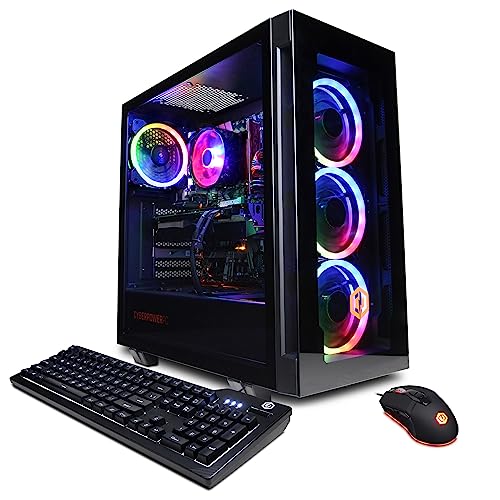
All 5 Picks at a Glance
| Product | Specs | Action |
|---|---|---|
 1. KOTIN Gaming PC Desktop With Ryzen 7 8700F and RTX 5060 Ti | Check price on Amazon | |
| 2. CyberPowerPC Gamer Xtreme VR With Core i7-13700F and RTX 4060 Ti 16GB | Check price on Amazon | |
 3. Skytech Gaming Archangel With Core i7-12700F and RTX 4060 Ti | Check price on Amazon | |
 4. Skytech Gaming Azure 3 With Ryzen 7 9700X and RTX 4060 | Check price on Amazon | |
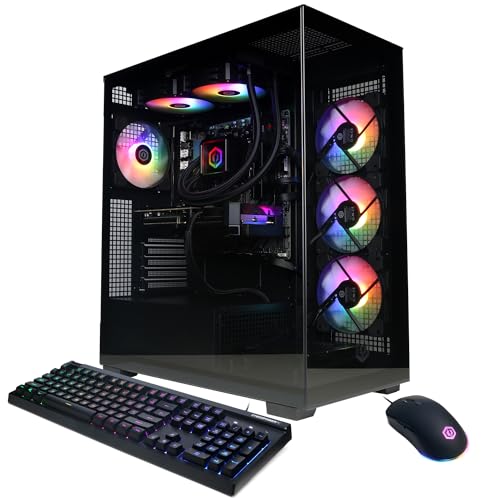 5. CyberPowerPC Gamer Xtreme With Ryzen 9 9900X and RTX 5070 | Check price on Amazon |
Key takeaways
- Compare the best desktop gaming computer picks: five prebuilt towers with modern graphics cards, fast SSD storage, generous memory and Windows 11 included.
As an Amazon Associate we earn from qualifying purchases.
Choosing a desktop gaming computer used to mean choosing parts. For a growing share of players, it now means choosing a finished tower: a prebuilt system that arrives assembled, with Windows installed, drivers loaded, and a single warranty covering the whole machine. That convenience is the real product, and it reframes how the specifications should be read. The best desktop gaming computer is not the one with the longest parts list; it is the one whose processor, graphics card, memory, and storage are balanced for the resolution and refresh rate of the monitor it will drive, with enough cooling and power supply headroom to stay stable through long sessions. This guide presents five prebuilt gaming desktops, all complete towers rather than components, spanning mainstream 1080p and 1440p play through to high-end configurations built for demanding settings, and explains how to tell which tier a given player actually needs.
Affiliate disclosure: This article contains affiliate links. If you buy through a link on this page, we may earn a commission at no additional cost to you.
Start With the Monitor, Not the Tower
The most common prebuilt buying mistake is shopping for a graphics card in the abstract. A tower that is ideal for a 1080p high-refresh esports monitor is a different machine from one intended for a 1440p display or a 4K television, and paying for capability the screen cannot show is the easiest way to overspend. Esports titles reward very high frame rates at 1080p, where a strong processor and a mid-range modern graphics card do the work. Story-driven games at 1440p shift the load toward the graphics card and its memory. At 4K, graphics memory and raw rendering power dominate the decision entirely.
With that frame in mind, the five picks below sort naturally. The mainstream towers pair current or recent graphics cards with 16GB of memory and a 1TB solid-state drive, a combination aimed at 1080p and 1440p play. The step-up systems add memory, move to newer graphics tiers, or both. None of the specifications quoted here are performance promises; they are the listings’ own stated configurations, and the buying logic is about matching those configurations to a screen and a game library.
The Four Specifications That Matter Most
Graphics card. This is the single largest determinant of gaming performance. Note both the model and its dedicated memory, because the same card name with different memory capacity behaves differently at higher resolutions and texture settings. Several listings in this guide note that the exact graphics card brand may vary within the stated model, which is normal practice among system builders and worth knowing before ordering.
Processor. The processor feeds the graphics card and handles game logic, streaming, and background tasks. Modern multi-core chips from the current and recent generations in these listings are well matched to their graphics cards; the practical differences appear in heavy multitasking, content creation alongside gaming, and very high frame rate play.
Memory. Sixteen gigabytes is the working standard for gaming in these systems, and 32GB appears on the higher-end pick for players who stream, edit video, or keep many applications open. Memory type matters for future upgrades: DDR5 systems use a newer platform than DDR4 systems, which affects what can be added later.
Storage. Every pick here uses a solid-state drive of at least 1TB, with NVMe drives throughout. One terabyte fills faster than new buyers expect once several large games are installed, so the upgrade path, meaning spare drive slots or an easy panel to open, is a genuine buying factor rather than a footnote.
How the Picks Were Chosen
Each pick had to be a complete prebuilt desktop gaming computer: a tower sold as a finished system with processor, graphics card, memory, storage, and operating system specified in the listing. Barebones kits, individual components, laptops, and mini PCs were excluded so that every recommendation is the same type of product and can be compared on the same terms. Listings also had to state the core configuration clearly, including graphics model, memory size and type, storage capacity, and operating system.
The resulting five span three recognizable tiers. Two are balanced mainstream towers built around proven graphics cards. Two are current-generation systems aimed at higher settings and longer service life. One is a high-end configuration for players who want maximum headroom. All five include Windows 11 Home according to their listings, and all are described by their makers as arriving assembled and ready to set up.
The 5 Best Desktop Gaming Computers
1. KOTIN Gaming PC Desktop With Ryzen 7 8700F and RTX 5060 Ti
The KOTIN gaming desktop is the most current mainstream configuration in this guide. Its listing specifies an AMD Ryzen 7 8700F processor paired with a GeForce RTX 5060 Ti graphics card with 8GB of GDDR7 memory, 16GB of DDR5 memory, and a 1TB PCIe Gen4 NVMe solid-state drive, with Windows 11 Home pre-installed. The maker positions the system for 1080p and 1440p gaming and streaming, and lists support for modern rendering features including DLSS 4 and ray tracing.
The supporting hardware shows attention to the details that decide ownership experience. A 650W 80 PLUS Gold power supply is listed, along with WiFi 7 and Bluetooth connectivity, a CPU air cooler with six copper heat pipes, and five 120mm ARGB fans. Upgrade room is explicitly addressed with four DDR5 memory slots and three M.2 storage slots, which is generous for a mainstream tower and extends the machine’s useful life considerably. The listing also carries a practical setup note: connect the monitor to the graphics card outputs on the back of the PC, not the motherboard ports. A one-year limited warranty and technical support are listed, and the system is described as assembled and tested in the USA.
View it on Amazon: https://www.amazon.com/dp/B0H27NNNK4
2. CyberPowerPC Gamer Xtreme VR With Core i7-13700F and RTX 4060 Ti 16GB
CyberPowerPC’s Gamer Xtreme VR, model GXiVR8040A14 in the listing, builds its appeal around one specification that stands out in its class: a GeForce RTX 4060 Ti graphics card with 16GB of video memory, double the capacity of the more common 8GB variant. That extra memory is relevant for players who favor high texture settings at 1440p and for anyone who also edits video or works with large creative files. The rest of the listed configuration is a Core i7-13700F processor, an Intel B760 chipset, 16GB of DDR5 memory, a 1TB PCIe Gen4 NVMe solid-state drive, and Windows 11 Home, with Wi-Fi ready connectivity and graphics outputs listed as one HDMI and two DisplayPort connections.
CyberPowerPC is one of the longest-established names in prebuilt gaming systems, and the Gamer Xtreme line is its mainstream enthusiast range. For a buyer who wants a recognized system builder, a balanced Intel platform, and the most graphics memory available at this tier in the guide, this configuration makes a clear and specific case for itself.
View it on Amazon: https://www.amazon.com/dp/B0CBL8N3FC
3. Skytech Gaming Archangel With Core i7-12700F and RTX 4060 Ti
The Skytech Archangel in white is the value-conscious route into the same general performance class, achieved by pairing an Intel Core i7-12700F processor with a GeForce RTX 4060 Ti graphics card with 8GB of GDDR6X memory, 16GB of DDR4 memory at 3200 speed, and a 1TB NVMe solid-state drive, running Windows 11 Home. The DDR4 platform is the honest trade-off that keeps this system positioned as a value pick: it gives up the newer memory standard of the DDR5 systems here in exchange for a lower entry point into a strong processor and graphics pairing.
Cooling and power are properly specified in the listing, with a 240mm liquid cooler and a 600W Gold power supply, and the white Archangel case gives it a distinctive look among mostly black towers. Skytech states that its systems are built and supported in the United States using branded components, which gives buyers a clear support route for a whole-system warranty. For 1080p high-refresh play and capable 1440p gaming on a sensible budget, the Archangel’s configuration is coherent and proven.
View it on Amazon: https://www.amazon.com/dp/B0C674J6R1
4. Skytech Gaming Azure 3 With Ryzen 7 9700X and RTX 4060
The Skytech Azure 3 pairs one of the newest processors in this guide with a proven graphics card, a combination aimed at players whose habits extend beyond gaming alone. The listing specifies an AMD Ryzen 7 9700X processor, a GeForce RTX 4060 graphics card with 8GB of GDDR6 memory, 16GB of DDR5 memory at 6000 speed, a 1TB NVMe solid-state drive, a 650W Gold power supply, and Windows 11 Home. The processor headroom suits streaming, content creation, and heavy multitasking alongside play, while the graphics card targets detailed 1080p gaming and solid 1440p performance in the kinds of titles the listing names.
Cooling is a headline feature: a 360mm liquid cooler with ARGB fans is listed, which is substantial cooling hardware for this class and supports quiet operation under sustained load. The white Azure case with tempered glass, Wi-Fi connectivity, a one-year parts and labor warranty, free technical support, and assembly in the USA round out the listing, which also notes that a gaming keyboard and mouse are included. Buyers whose priority is a modern platform with strong all-round computing power, rather than the maximum graphics tier, will find this the most balanced option here.
View it on Amazon: https://www.amazon.com/dp/B0DQ6PVLCV
5. CyberPowerPC Gamer Xtreme With Ryzen 9 9900X and RTX 5070
The high-end pick in this guide is CyberPowerPC’s Gamer Xtreme configuration built on an AMD Ryzen 9 9900X processor and a GeForce RTX 5070 graphics card with 12GB of memory. The listing specifies 32GB of DDR5 memory, double the mainstream systems here, a 1TB PCIe 4.0 solid-state drive, Wi-Fi ready connectivity, and Windows 11 Home, with the desktop, keyboard, mouse, and power cord listed among the included items. This is the configuration for a player driving a high-refresh 1440p monitor or a 4K display, and for creators whose rendering and editing work benefits from both the processor cores and the memory capacity.
Stepping up to this tier buys headroom rather than a different experience: settings can be raised, frame rates hold steadier in demanding scenes, and the system stays comfortable with new releases for longer before an upgrade conversation begins. The one specification to plan around is storage, since 1TB is the same capacity as the mainstream picks; the large game libraries that high-end players tend to accumulate will likely make an additional drive an early and worthwhile addition.
View it on Amazon: https://www.amazon.com/dp/B0DXVFWSS7
Side-by-Side Comparison
| System | Processor | Graphics card | Memory | Storage |
|---|---|---|---|---|
| KOTIN Gaming PC | Ryzen 7 8700F | RTX 5060 Ti 8GB | 16GB DDR5 | 1TB Gen4 NVMe SSD |
| CyberPowerPC Gamer Xtreme VR | Core i7-13700F | RTX 4060 Ti 16GB | 16GB DDR5 | 1TB Gen4 NVMe SSD |
| Skytech Archangel | Core i7-12700F | RTX 4060 Ti 8GB | 16GB DDR4 | 1TB NVMe SSD |
| Skytech Azure 3 | Ryzen 7 9700X | RTX 4060 8GB | 16GB DDR5 | 1TB NVMe SSD |
| CyberPowerPC Gamer Xtreme | Ryzen 9 9900X | RTX 5070 12GB | 32GB DDR5 | 1TB PCIe 4.0 SSD |
Read the table by tier rather than by row. The graphics card and its memory separate the gaming ceilings, the memory type indicates the platform generation and upgrade path, and the final row is the only system that doubles system memory, which matters most to players who also create.
Setting Up a Prebuilt the Right Way
A prebuilt tower rewards a careful first hour. Open the case before powering on if the maker instructs it, because systems often ship with protective foam inside the case that must be removed. Connect the monitor cable to the graphics card outputs on the back of the tower, as the KOTIN listing explicitly reminds buyers, rather than to the motherboard video ports, which bypass the graphics card entirely. Run Windows updates and graphics driver updates before installing a game library, and check that the display’s refresh rate is set to its rated value in the operating system, since many high-refresh monitors default to a lower rate until told otherwise.
Then confirm the basics in the system information: the installed memory amount, the drive capacity, and the graphics card model should match the listing configuration. This five-minute check is the easiest quality control a buyer can perform, and it is far simpler to resolve any mismatch in the first days than months later. Finally, register the warranty and keep the packaging until the system has run through several long sessions without issue.
Upgrade Paths and Ownership
Prebuilt does not mean sealed forever. The systems here use standard tower formats to varying degrees, and the listings that detail spare memory slots and drive bays, such as the KOTIN configuration, make future storage and memory additions straightforward. The realistic upgrade order for most owners is storage first, since game libraries grow fastest, then memory for those who add streaming or editing to their routine. Graphics card upgrades later in a system’s life depend on power supply capacity and case clearance, which is why the listed power supply wattage and certification are worth noting at purchase time rather than years later.
Warranty handling is the other ownership difference between prebuilt and self-built machines: one maker covers the whole system, so a fault is a single conversation instead of a diagnosis across separate component warranties. The listings here variously describe one-year parts and labor coverage and technical support arrangements, and the exact terms on the live listing should be read before ordering, since support quality is part of what a prebuilt premium buys.
What to Avoid When Buying a Prebuilt
Avoid systems whose listings hide the graphics card model behind vague language, since the graphics card is the core of a gaming computer and should always be named precisely. Avoid configurations with a strong graphics card paired with unusually low memory or a small drive, which signal cost-cutting where it will be felt daily. Be wary of older graphics generations presented without context at prices near current models, and treat any listing that does not state the operating system, power supply, or warranty terms as incomplete. The five systems in this guide were chosen partly because their listings state these essentials plainly.
Verdict
The best desktop gaming computer is the prebuilt tower matched to its monitor and its owner’s habits. The KOTIN system offers the most current mainstream configuration with unusually good upgrade room. The CyberPowerPC Gamer Xtreme VR stands out for its 16GB graphics memory at a mainstream tier. The Skytech Archangel delivers a proven processor and graphics pairing as the value pick on a DDR4 platform, while the Skytech Azure 3 suits players who want a new-generation processor and strong cooling for mixed gaming and creation. The CyberPowerPC Gamer Xtreme with the RTX 5070 is the headroom choice for high-refresh 1440p and 4K ambitions. Decide the resolution first, and the right row of the comparison table usually chooses itself.